Getting Started with GeoTasker: Create Your First Map Video
Learn how to create stunning animated geospatial story videos with AI. This beginner's guide walks you through the entire process from prompt to final video.
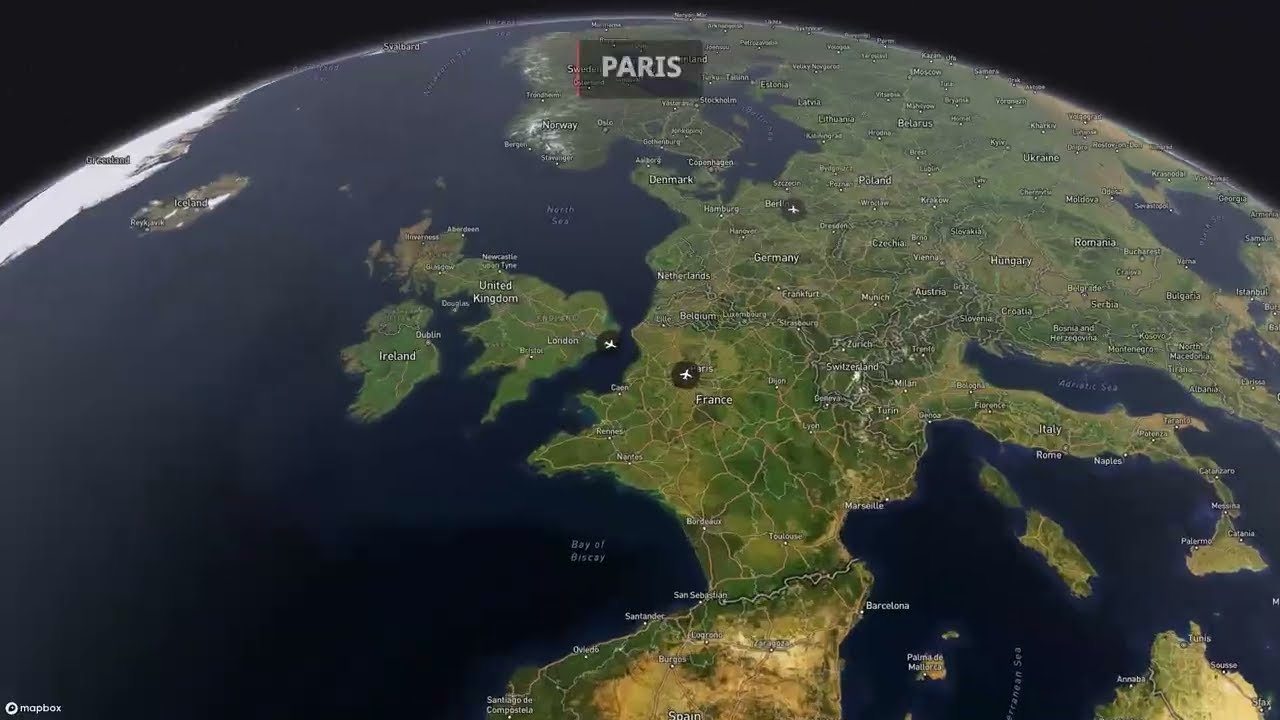
Getting Started with GeoTasker
GeoTasker makes it easy to create animated geospatial story videos using natural language. Just describe what you want, and AI handles the rest.
What You Can Create
With GeoTasker, you can create videos that:
- Tell geographic stories with animated map movements and annotations
- Visualize data through choropleth maps and charts
- Engage audiences with professional narration and background music
Pro Tip
Start with simple prompts and iterate. GeoTasker works best when you provide clear, specific descriptions of what you want to visualize.
Your First Video: A Simple Example
Let's create a video showing the capitals of Europe. Here's a sample prompt:
Create a 30-second video tour of European capitals. Start with London,
then fly to Paris, Berlin, and Rome. Show each city name with a marker
and add a brief fun fact about each capital.
What GeoTasker Does
- Parses your intent - Understands you want a map tour with annotations
- Generates the story - Creates a structured video plan with segments
- Renders the video - Produces an MP4 with smooth map animations
- Adds narration - Synthesizes natural-sounding voiceover
- Applies music - Adds appropriate background music
See It in Action
Watch how GeoTasker takes a prompt, generates a story plan, and renders the final video — all through a simple chat interface:
Video Output
And here's the finished video:
Warning
Processing time varies based on video complexity. Simple videos take 1-2 minutes, while complex multi-segment videos may take 5-10 minutes.
Advanced Features
Once you're comfortable with basic videos, explore these advanced features:
| Feature | Description |
|---|---|
| Choropleth Maps | Data-driven color coding by region |
| Multi-Language | Narration in 32+ languages |
| Custom Music | Choose from multiple background music styles |
| Chart Overlays | Add animated charts to your map videos |
Code Example
If you're integrating GeoTasker into your application, here's a basic API example:
import time
import requests

API_KEY = "gt_live_your_key_here"
headers = {"X-API-Key": API_KEY}

# Generate a video from a text prompt
resp = requests.post(
  "https://geotasker.ai/api/v1/generate",
  headers=headers,
  json={
      "prompt": "Create a 30-second tour of European capitals",
      "options": {
          "resolution": "1080p",
          "music_style": "Cinematic"
      }
  }
)
task = resp.json()
print(f"Task created: {task['id']}")

# Poll until the video is ready
while True:
  status = requests.get(
      f"https://geotasker.ai/api/v1/videos/{task['id']}",
      headers=headers
  ).json()
  print(f"Status: {status['status']} | Progress: {status.get('progress', '-')}%")

  if status["status"] == "completed":
      print(f"Video ready: {status['video_url']}")
      break
  elif status["status"] == "failed":
      print(f"Error: {status.get('error')}")
      break

  time.sleep(5)
Next Steps
Ready to create your own map videos? Here's what to do next:
- Sign up at geotasker.ai
- Write your first prompt describing the video you want
- Iterate and refine based on the output
- Share your creation with the world!
Info
Free tier includes $5 credit (approximately 1-2 videos). Check out pricing for Pro and Enterprise plans.
Questions? Join our community on Discord or leave a comment below. We'd love to see what you create!
Create Your Own Geospatial Story Videos
GeoTasker uses AI to transform your ideas into stunning animated map videos with narration, captions, and music.
Try GeoTasker Free